DEEN
The product

The Visual Invention Workspace.

ErfinderWerk connects technical ideas, materials, features, solution variants and patent preparation in one workspace. AI and algorithms help with organizing and drafting. You see relationships instead of searching through texts, and you actively develop the invention further.

Inventing starts before the patent wording.

It starts with the technical problem, the overall idea, requirements, open questions and first solutions. ErfinderWerk keeps these parts together so that a thought becomes an invention that can be explained. The images show the real application on the same case: an ice-free evaporator for air-to-water heat pumps.

Idea Space of the application with connected building blocks for the heat pump evaporator
Idea Space. The open canvas: connect building blocks, keep failed attempts, with the AI tools at your side. Shown here: the example “Ice-free evaporator for air-to-water heat pumps”.
Drafting in the application with features, claim set and description
Drafting. From the model to the written application: order features, claim set, figures, description and patent draft, with one AI pass over the entire document.
Handover package with an overview of what is ready and what is still missing
Handover package. What is ready for the attorney or the patent department and what is still missing, at a glance.

AI and algorithms. Structural. Technical. Visual.

Notes, documents and ideas become a technical model. AI and algorithms help with organizing, linking and drafting; not every step is a language model. The technical decisions stay with you.

Structural

Problems, solutions, features, requirements and open questions become traceable technical building blocks.

Model built from notes with problem, solution, technical core and building blocks
The resulting model. Built from exactly these notes: problem, solution, technical core and benefit, plus the building blocks with features, working principles and open questions.

Technical

Working principles, technical alternatives and relationships between features can be examined and developed in a targeted way.

Drafting with features, working principles and claim set
Drafting. From the model to the written application: order features, claim set, figures, description and patent draft, with one AI pass over the entire document.

Visual

The canvas makes relationships and focal points visible. One click on “Arrange” places the solutions as rings around the problem.

Canvas after arranging: the problem in the center, the solutions as rings
Idea Space after “Arrange”. The sun is the problem, the rings are the solutions.

From material to model: the process.

Keep using what already exists: presentations, reports, sketches and measurement data from the project become the basis of the invention instead of being typed in again.

  1. Import. The material turns into building blocks with features, working principles and open questions.
  2. Review. You confirm, connect and add to the extracted features.
  3. Arrange. The canvas places the solutions around the problem and shows focal points.
  4. Weigh up. Technical alternatives stand side by side and can be compared deliberately.

The file formats the application reads are listed on the page for inventors. The film on the home page shows how a first thought becomes an organized model; it is an animation, not a recording of the application.

Raw notes from the test bench as source material in the application
Drop in material. Raw notes from the test bench, typed just as they came about. That is all you need to start.

Develop and connect visually.

The visual invention workspace is the canvas of the invention. It is the same for private inventors and all organization profiles: fully interactive, with free editing. Differences lie in roles, rights and AI budget, not in the workspace itself. The Wizard is the quick mode on the same technology, without a visual canvas.

Workspace: edit interactively

Create building blocks, change relationships, keep failed attempts and use the AI tools at your side. You develop the invention further yourself, alone or as a team.
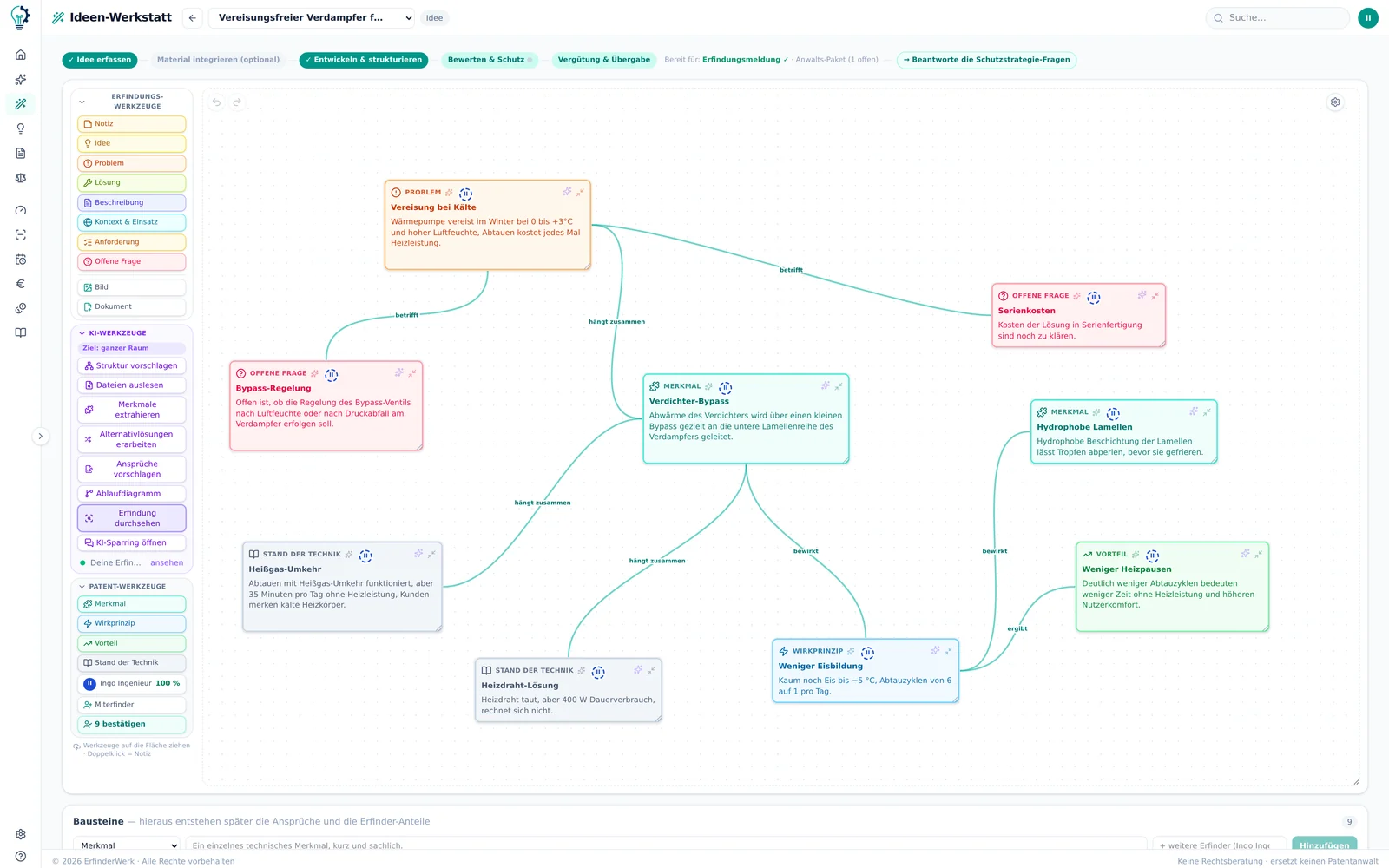
Interactive canvas with toolbar
Idea Space. The open canvas: connect building blocks, keep failed attempts, with the AI tools at your side. Shown here: the example “Ice-free evaporator for air-to-water heat pumps”.

Wizard: the quick mode

The guided quick run uses the same technical engine, AI and algorithms as the workspace. You upload material and files, the AI prepares the content, and the patent draft is produced as text.

Wizard: entering notes and files as source material
Drop in material. Raw notes from the test bench, typed just as they came about. That is all you need to start.

Wizard and Private Inventor compared →

Invention disclosure in eight steps, prefilled from the Idea Space
Invention disclosure. Eight steps to the disclosure under § 5 ArbnErfG (German Employee Inventions Act), prefilled from the Idea Space, with co-inventors and shares.

Research and patent draft.

Search hints and a comparison with the prior art show where your solution stands. Features, claim set, figures and description are drafted from the model. One AI pass over the entire document shows gaps, and you decide what stays.

  • The research uses public registers and the web. It does not replace a complete search by experts or a check of whether you infringe third-party IP rights.
  • Drafts are produced in German.
  • The result is a draft, not a filing. You file the application yourself or through your patent attorney.

One case. Several contributors. Drafted together.

Inventors, co-inventors, teams, companies and patent attorneys work on the same case, each with the rights assigned to them. Nothing is sent back and forth as an attachment, and every state remains traceable as a version.

Developing inventions in a company →
Client and law firm in the same case →
Involving experts: the expert network as an outlook →

Shared invention case: inventor, co-inventor, company and patent attorney work in the same case.Inventorscontributes the idea andworks it out in astructured way.Co-inventor / teamadds, discusses anddevelops theinvention furthertogether.Companieskeeps the overview,steers the processand decides onthe next steps.Patent attorney /expertreviews, gives feedbackand supports thepatent preparation.ShareShared invention caseProblemSolutionFeatureWorking principleApprovals & rolesClear responsibilities, securecollaboration.Documents & draftAll content keptin one place, up tothe patent draft.Shared invention case: inventor, co-inventor, company and patent attorney work in the same case.ShareShared invention caseProblemSolutionFeatureWorking principleInventorscontributes the idea and works it outin a structured way.Co-inventor / teamadds, discusses and develops theinvention further together.Companieskeeps the overview, steers theprocess and decides on thenext steps.Patent attorney / expertreviews, gives feedback and supportsthe patent preparation.Approvals & rolesClear responsibilities, securecollaboration.Documents & draftAll content in one place, up tothe patent draft.
Schematic diagram. One case with several contributors, not a screenshot of the application.

The full cycle: from the idea to remuneration.

Everything stays connected and returns to the start with the next idea.

Five stations from the idea to remuneration, with an arrow back to the next idea. IdeaCapture ideas,structure, develop DraftingFeatures, claims,description, figures CollaborationCo-inventors andtheir shares in view Handover and filingDisclosure, attorney packageor your own filing RemunerationCalculated underofficial guidelinesTHE NEXT IDEA

… and back to the start.

One platform. Different ways of working.

Wizard

The quick mode on the same technology as the workspace: AI-assisted processing of material and files, all the way to the patent draft as text.

Private Inventor

The complete interactive invention workspace with free editing on the canvas, for everyone who wants to work visually on the model.

Companies

The same visual core for teams, with roles, approvals, AI budgets and inventor remuneration.

Patent law firms

Client and law firm work on the same invention case, with review and approvals.

Enterprise

Adds your own AI and your own infrastructure to the workspace.

Compare all features → · Plans and prices →

What ErfinderWerk does not replace.

No legal representation

ErfinderWerk does not give legal advice and does not file patents. That remains the job of your patent attorney.

No seal of patentability

The assessment is based on your data and the research, not on an official examination. Whether an IP right will be granted remains open.

No complete freedom-to-operate analysis

The application does not examine whether a use infringes third-party IP rights.

Market launch Q4 2026 Part of the market launch in the fourth quarter of 2026.

Simply try it out.

The waitlist is free and without obligation. We are happy to answer questions about teams and IP processes in advance.